背景
使用hexo框架写文章时,需要为文章生成永久链接,以保证即使文章的文件名更改后,文章的链接也不会变化。之前我使用了hexo-abbrlink插件来完成这一工作,但其存在一个问题——当我没有在本地没有使用hexo generate或者hexo server命令时,文章的abbrlink不会生成,此时我提交代码到github上,触发CI/CD流程,文章的abbrlink不会被记录到远程仓库中。
思路
文章的abbrlink应该在hexo new命令执行时生成!查看hexo官网API文档,发现可以监听new事件,于是想到可以在事件的回调中,为文件添加上abbrlink属性

解决
在根目录下新建一个script目录 ,创建一个文件:auto-abbrlink.js,将下面的代码粘贴进去:
1
2
3
4
5
6
7
8
9
10
11
12
13
14
15
16
17
18
19
20
21
22
23
24
25
26
27
28
29
30
31
32
33
34
35
36
37
38
39
40
41
42
43
44
45
46
47
48
49
50
51
52
53
54
55
56
57
| const fs = require("fs")
const path = require("path")
const crc = require("crc")
hexo.on("new", function (post) {
console.log("脚本执行")
const filePath = post.path
fs.readFile(filePath, "utf8", function (err, data) {
if (err) {
hexo.log.error("读取文件失败:", err)
return
}
const abbrlinkRegex = /abbrlink:\s*(\S+)/
const match = data.match(abbrlinkRegex)
if (match && match[1]) {
hexo.log.info("文章已经有 abbrlink 值:", match[1])
return
}
const config = hexo.config.abbrlink || { alg: "crc32", rep: "hex" }
const title = post.title || path.basename(filePath, ".md")
let abbrlinkValue
if (config.alg === "crc32") {
abbrlinkValue = crc.crc32(title)
} else {
abbrlinkValue = crc.crc16(title)
}
if (config.rep === "hex") {
abbrlinkValue = abbrlinkValue.toString(16)
} else {
abbrlinkValue = abbrlinkValue.toString(10)
}
const newData = data.replace(/^(---[\s\S]*?)---/, `$1abbrlink: ${abbrlinkValue}\n---`)
fs.writeFile(filePath, newData, "utf8", function (err) {
if (err) {
hexo.log.error("写入文件失败:", err)
return
}
hexo.log.info("成功为新文章生成 abbrlink:", abbrlinkValue)
})
})
})
|
安装crc依赖到项目中
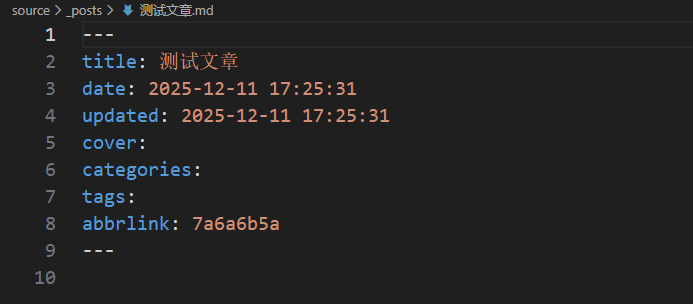
执行hexo new命令测试:
查看新生成的md文件,可以看到新生成的文章已经添加上了abbrlink,大功告成!

 微信
微信 支付寶
支付寶